Layers
History
Layers
History
Translate text in an image
Original photos stay on your device: only plain-text lines go to the translator, building editable layers free without sign-in.
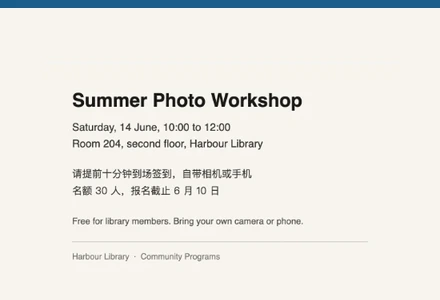 Original notice
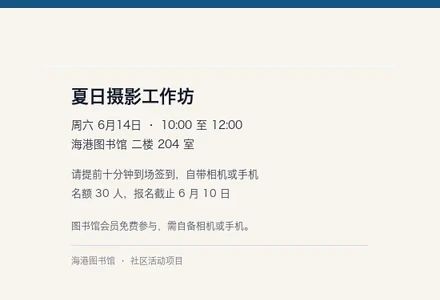 Translated layers
How to use it
Need an overseas product detail graphic, menu or foreign app screenshot translated without flattening ugly boxes over the artwork? Photopip reads words on your device, merges multi-line paragraphs so sentences translate naturally, sends only clean plain-text strings (never your photo) to the translator, erases old ink, and generates fully editable text layers—free with no sign-in and ready to export to JPG, PNG, WEBP or layered PSD.
- Click Choose an image to translate, drag in a photo or screenshot, or press Ctrl+V to paste.
- Photopip reads text positions locally, sends only extracted plain-text strings to translate (free, no sign-in needed), and holds off pixel erasure until translation returns cleanly.
- Click any target language chip () on the card to re-translate from the clean baseline without stacking duplicate layers; double-click any layer on canvas to refine phrasing or font size.
- Download PNG, JPG, WEBP, or Save PSD to hand off editable translated typography.
| Item | Details |
|---|---|
| Cost & access | Free, no sign-in required; anonymous usage is protected by per-IP rate limits and a daily site safety cap |
| What leaves device | Translator receives ONLY plain-text strings (up to 60 text blocks / 6,000 chars); on desktop, solid/gradient images never send photo pixels (complex textured photos may send local 1536 px repair windows, deleted within 1 hour) |
| Editable layers | Translated copy lands in size-matched independent text layers via 1-step composite undo—double-click to edit wording, drag or recolor, and save PSD |
| Language switching | Switching target language chips on the card automatically undoes the prior translation back to the clean baseline before translating again |
Processes up to 60 major text blocks per image (over 6,000 combined characters are refused safely). Complex curved badges, glossy 3D metallic fonts or multi-script vertical layouts match nearest standard horizontal fonts and may need quick manual nudging on canvas. Anonymous traffic shares rate limits and a daily site safety cap; if reached, try again later.
- Does Photopip send my whole product photo or chat screenshot to a language model?
- No. On desktop browsers, text extraction runs locally first and ONLY the recognized plain-text string array and target language are sent to the translation endpoint—never the raw image file to the language model. On textured photo backgrounds, only partial 1536 px crop patches around text boxes use cloud repair if needed.
- Do I have to create an account or pay per image?
- No. Image translation is free with no sign-in required for normal anonymous usage, protected by anti-abuse rate limits and a daily safety cap rather than credit walls or watermarks.
- Can I fix a word the translator phrased awkwardly or move text boxes afterward?
- Yes. Every translated block stays an independent text layer rather than flattened pixels. Double-click any text on the canvas to adjust wording, color or font size, or save a layered PSD.
- What happens if I switch from Japanese to Spanish after translating once?
- The result card automatically runs one undo back to your clean original image before applying the next language, so translated text layers never pile on top of each other.
Updated 2026-11-22
Translate text in an image
Original photos stay on your device: only plain-text lines go to the translator, building editable layers free without sign-in.
Original noticeTranslated layersHow to use it
Need an overseas product detail graphic, menu or foreign app screenshot translated without flattening ugly boxes over the artwork? Photopip reads words on your device, merges multi-line paragraphs so sentences translate naturally, sends only clean plain-text strings (never your photo) to the translator, erases old ink, and generates fully editable text layers—free with no sign-in and ready to export to JPG, PNG, WEBP or layered PSD.
- Click Choose an image to translate, drag in a photo or screenshot, or press Ctrl+V to paste.
- Photopip reads text positions locally, sends only extracted plain-text strings to translate (free, no sign-in needed), and holds off pixel erasure until translation returns cleanly.
- Click any target language chip () on the card to re-translate from the clean baseline without stacking duplicate layers; double-click any layer on canvas to refine phrasing or font size.
- Download PNG, JPG, WEBP, or Save PSD to hand off editable translated typography.
| Item | Details |
|---|---|
| Cost & access | Free, no sign-in required; anonymous usage is protected by per-IP rate limits and a daily site safety cap |
| What leaves device | Translator receives ONLY plain-text strings (up to 60 text blocks / 6,000 chars); on desktop, solid/gradient images never send photo pixels (complex textured photos may send local 1536 px repair windows, deleted within 1 hour) |
| Editable layers | Translated copy lands in size-matched independent text layers via 1-step composite undo—double-click to edit wording, drag or recolor, and save PSD |
| Language switching | Switching target language chips on the card automatically undoes the prior translation back to the clean baseline before translating again |
Processes up to 60 major text blocks per image (over 6,000 combined characters are refused safely). Complex curved badges, glossy 3D metallic fonts or multi-script vertical layouts match nearest standard horizontal fonts and may need quick manual nudging on canvas. Anonymous traffic shares rate limits and a daily site safety cap; if reached, try again later.
- Does Photopip send my whole product photo or chat screenshot to a language model?
- No. On desktop browsers, text extraction runs locally first and ONLY the recognized plain-text string array and target language are sent to the translation endpoint—never the raw image file to the language model. On textured photo backgrounds, only partial 1536 px crop patches around text boxes use cloud repair if needed.
- Do I have to create an account or pay per image?
- No. Image translation is free with no sign-in required for normal anonymous usage, protected by anti-abuse rate limits and a daily safety cap rather than credit walls or watermarks.
- Can I fix a word the translator phrased awkwardly or move text boxes afterward?
- Yes. Every translated block stays an independent text layer rather than flattened pixels. Double-click any text on the canvas to adjust wording, color or font size, or save a layered PSD.
- What happens if I switch from Japanese to Spanish after translating once?
- The result card automatically runs one undo back to your clean original image before applying the next language, so translated text layers never pile on top of each other.
Updated 2026-11-22