Layers
History
Layers
History
Edit text in an image or screenshot
Turns flattened image words into editable text layers—local on solid backdrops, free PSD.
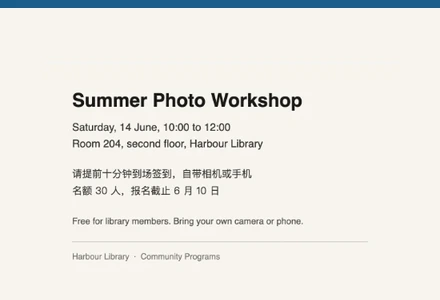 Original image
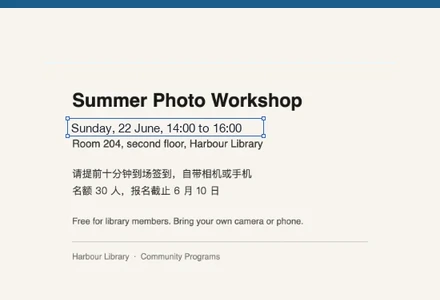 Editable text layer
How to use it
Fix a typo, date, price or address in a flattened screenshot, menu or poster when you no longer have the source file. Photopip detects text blocks locally on capable desktop computers, erases the original characters without blurring adjacent UI, and places each block on its own editable text layer matched by size and color—no account, watermark or download cap, and you can export PNG, JPG, WEBP or layered PSD.
- Click Choose an image or screenshot, drop a file onto the page, or press Ctrl+V to paste a screenshot directly.
- Photopip runs text detection, merges adjacent lines into paragraphs, erases old ink in one step, and creates independent editable text layers.
- Double-click any text layer on the canvas to change words, fix numbers, drag its position, or swap font family and color; press Ctrl+Z once to undo all generated layers together.
- Download directly as PNG, JPG, or WEBP, or click Save PSD to carry layered typography into future edits.
| Item | Details |
|---|---|
| Local vs cloud path | On desktop with sufficient memory, both OCR and solid/gradient background cleanup run inside your browser; complex textured photos send only local 1536 px crop windows for repair (auto-deleted within 1 hour) |
| Editable output | Up to 60 largest text blocks per run become independent text layers matched to nearby Latin sans, serif or monospace system fonts (and CJK stacks when Chinese characters are detected) |
| Undo safety | All background erasure and text layer creation commits as one grouped history step—one Ctrl+Z restores your original pixels |
| Privacy & session | Marked as sensitive: Microsoft Clarity session recording stays off, and opened files are never saved to Recent Files or local auto-storage |
Maximum 60 text blocks per image (smaller captions beyond 60 are skipped cleanly). Stylized 3D, curved, embossed or handwritten fonts match the nearest system sans/serif/monospace face rather than replicating custom lettering effects. Low-power phones or low-memory browsers route OCR through our server over HTTPS and clear temporary server files automatically (immediately on the primary OCR path, or within 1 hour on fallback).
- Will editing one number or word blur my screenshot or leave smudges?
- No. Instead of painting pixels over the whole picture, Photopip cleans the exact character background and creates vector-sharp editable text layers above your intact screenshot.
- Do sensitive receipts or chat screenshots upload to a server?
- On standard desktop browsers with plain or gradient card backdrops, both text recognition and background cleanup stay 100% on your device. Only complex textured photo regions send partial 1536 px repair windows, and Clarity recording plus local auto-save stay disabled.
- Do I need an account or subscription to download layered PSD?
- No. All image exports (PNG, JPG, WEBP) and layered Save PSD exports work free with no sign-up and no watermarks.
- What if a multi-line sentence splits or gets recognized imperfectly?
- Double-click the layer to correct spelling or resize the text frame directly on canvas, or press Ctrl+Z once to revert the whole conversion cleanly.
Updated 2026-11-22
More toolsTranslate imageScreenshot editorScreenshot to text
Edit text in an image or screenshot
Turns flattened image words into editable text layers—local on solid backdrops, free PSD.
Original imageEditable text layerHow to use it
Fix a typo, date, price or address in a flattened screenshot, menu or poster when you no longer have the source file. Photopip detects text blocks locally on capable desktop computers, erases the original characters without blurring adjacent UI, and places each block on its own editable text layer matched by size and color—no account, watermark or download cap, and you can export PNG, JPG, WEBP or layered PSD.
- Click Choose an image or screenshot, drop a file onto the page, or press Ctrl+V to paste a screenshot directly.
- Photopip runs text detection, merges adjacent lines into paragraphs, erases old ink in one step, and creates independent editable text layers.
- Double-click any text layer on the canvas to change words, fix numbers, drag its position, or swap font family and color; press Ctrl+Z once to undo all generated layers together.
- Download directly as PNG, JPG, or WEBP, or click Save PSD to carry layered typography into future edits.
| Item | Details |
|---|---|
| Local vs cloud path | On desktop with sufficient memory, both OCR and solid/gradient background cleanup run inside your browser; complex textured photos send only local 1536 px crop windows for repair (auto-deleted within 1 hour) |
| Editable output | Up to 60 largest text blocks per run become independent text layers matched to nearby Latin sans, serif or monospace system fonts (and CJK stacks when Chinese characters are detected) |
| Undo safety | All background erasure and text layer creation commits as one grouped history step—one Ctrl+Z restores your original pixels |
| Privacy & session | Marked as sensitive: Microsoft Clarity session recording stays off, and opened files are never saved to Recent Files or local auto-storage |
Maximum 60 text blocks per image (smaller captions beyond 60 are skipped cleanly). Stylized 3D, curved, embossed or handwritten fonts match the nearest system sans/serif/monospace face rather than replicating custom lettering effects. Low-power phones or low-memory browsers route OCR through our server over HTTPS and clear temporary server files automatically (immediately on the primary OCR path, or within 1 hour on fallback).
- Will editing one number or word blur my screenshot or leave smudges?
- No. Instead of painting pixels over the whole picture, Photopip cleans the exact character background and creates vector-sharp editable text layers above your intact screenshot.
- Do sensitive receipts or chat screenshots upload to a server?
- On standard desktop browsers with plain or gradient card backdrops, both text recognition and background cleanup stay 100% on your device. Only complex textured photo regions send partial 1536 px repair windows, and Clarity recording plus local auto-save stay disabled.
- Do I need an account or subscription to download layered PSD?
- No. All image exports (PNG, JPG, WEBP) and layered Save PSD exports work free with no sign-up and no watermarks.
- What if a multi-line sentence splits or gets recognized imperfectly?
- Double-click the layer to correct spelling or resize the text frame directly on canvas, or press Ctrl+Z once to revert the whole conversion cleanly.
Updated 2026-11-22
More toolsTranslate imageScreenshot editorScreenshot to text