Layers
History
Layers
History
Make a cross-stitch pattern from a photo
Free, in your browser, nothing uploaded: a counted chart up to 100 stitches wide in DMC floss numbers, with symbols, and you can edit any stitch before you print.
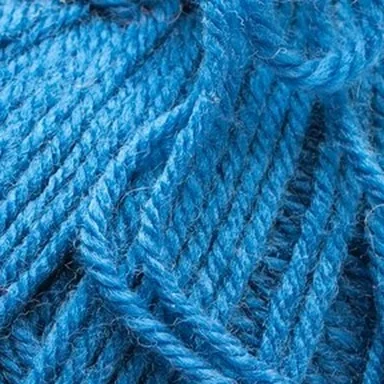 Photo, 12 × 12 stitch area
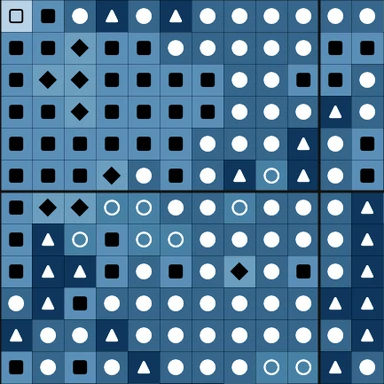 Chart: DMC symbols, bold line every 10
How to use it
Choose a photo and Photopip shrinks it to 50 stitches on the long side, groups it into at most 12 colors and gives each color the nearest DMC floss number. The chart has a thin line around every stitch, a bold line every 10, a symbol in each square for black-and-white printing, and a key with the DMC number, name and stitch count of every color. On our sample, a 1200 × 1200 photo of a ball of yarn, it came out as 50 × 50 stitches in 11 DMC colors, about 9 × 9 cm on 14-count Aida (tested 29 Oct 2026 in Chrome).
- Click Choose a photo, or drop one on the page.
- The card shows a chart 50 stitches on the long side. Pick 29, 50 or 100 stitches and 8, 12 or 16 colors; the chart is redrawn from the photo each time. The line under the chips gives the finished size on 14-count Aida.
- Under Thread, keep DMC floss for DMC numbers in the key, or pick From picture to keep the photo's own colors. Turn Symbols off for a color-only chart.
- Click Download PNG for the chart, or Export as PDF for one A4 page.
- To change single stitches, close the card (✕) and paint over a square with the Pencil Tool (B); zoom in and paint inside the grid lines.
| Item | Details |
|---|---|
| Opens | PNG, JPG, WebP, HEIC and other images your browser can open; one at a time |
| Threads | 454 DMC stranded cotton colors (screen approximations of the published shades), or the photo's own colors |
| Saves | PNG of the chart with key, or a one-page PDF on A4 |
| Tested | Sample yarn photo 1200 × 1200 → 50 × 50 stitches, 11 DMC colors, chart 1880 × 2052 px, about 9 × 9 cm on 14-count Aida (29 Oct 2026) |
| Where | In your browser; the photo is not uploaded |
Screen colors only approximate real floss, so check the skeins before you buy. The background is counted as a color too. A busy background breaks into scattered single stitches at 29 or 50; a single subject on a plain background works best, and a face needs 100. The chart is one page, not split into sections, and there is no backstitch or confetti cleanup tool.
- Can I turn a photo into a cross-stitch pattern for free?
- Yes. The chart, the DMC key and the PNG or PDF download are free, with no account and no watermark. The photo stays in your browser.
- Does the pattern use DMC thread numbers?
- Yes. Each color in the chart takes the nearest of 454 DMC stranded cotton colors, and the key lists the number, name and stitch count. The colors on screen are approximations, so compare the skeins in a shop.
- How big will the finished cross-stitch be?
- 50 stitches on 14-count Aida is about 9 cm (3.6 in); 100 stitches is about 18 cm. The card shows the size for the grid you pick.
- Why are there so many single stitches?
- Too many colors or a busy background. Pick 8 colors, or use a photo with a plain background, then paint the stray stitches with the Pencil Tool.
- Can I print it in black and white?
- Yes, with Symbols on: every square carries its color's symbol, and the key matches each symbol to a DMC number.
Updated 2026-10-29
Make a cross-stitch pattern from a photo
Free, in your browser, nothing uploaded: a counted chart up to 100 stitches wide in DMC floss numbers, with symbols, and you can edit any stitch before you print.
Photo, 12 × 12 stitch areaChart: DMC symbols, bold line every 10How to use it
Choose a photo and Photopip shrinks it to 50 stitches on the long side, groups it into at most 12 colors and gives each color the nearest DMC floss number. The chart has a thin line around every stitch, a bold line every 10, a symbol in each square for black-and-white printing, and a key with the DMC number, name and stitch count of every color. On our sample, a 1200 × 1200 photo of a ball of yarn, it came out as 50 × 50 stitches in 11 DMC colors, about 9 × 9 cm on 14-count Aida (tested 29 Oct 2026 in Chrome).
- Click Choose a photo, or drop one on the page.
- The card shows a chart 50 stitches on the long side. Pick 29, 50 or 100 stitches and 8, 12 or 16 colors; the chart is redrawn from the photo each time. The line under the chips gives the finished size on 14-count Aida.
- Under Thread, keep DMC floss for DMC numbers in the key, or pick From picture to keep the photo's own colors. Turn Symbols off for a color-only chart.
- Click Download PNG for the chart, or Export as PDF for one A4 page.
- To change single stitches, close the card (✕) and paint over a square with the Pencil Tool (B); zoom in and paint inside the grid lines.
| Item | Details |
|---|---|
| Opens | PNG, JPG, WebP, HEIC and other images your browser can open; one at a time |
| Threads | 454 DMC stranded cotton colors (screen approximations of the published shades), or the photo's own colors |
| Saves | PNG of the chart with key, or a one-page PDF on A4 |
| Tested | Sample yarn photo 1200 × 1200 → 50 × 50 stitches, 11 DMC colors, chart 1880 × 2052 px, about 9 × 9 cm on 14-count Aida (29 Oct 2026) |
| Where | In your browser; the photo is not uploaded |
Screen colors only approximate real floss, so check the skeins before you buy. The background is counted as a color too. A busy background breaks into scattered single stitches at 29 or 50; a single subject on a plain background works best, and a face needs 100. The chart is one page, not split into sections, and there is no backstitch or confetti cleanup tool.
- Can I turn a photo into a cross-stitch pattern for free?
- Yes. The chart, the DMC key and the PNG or PDF download are free, with no account and no watermark. The photo stays in your browser.
- Does the pattern use DMC thread numbers?
- Yes. Each color in the chart takes the nearest of 454 DMC stranded cotton colors, and the key lists the number, name and stitch count. The colors on screen are approximations, so compare the skeins in a shop.
- How big will the finished cross-stitch be?
- 50 stitches on 14-count Aida is about 9 cm (3.6 in); 100 stitches is about 18 cm. The card shows the size for the grid you pick.
- Why are there so many single stitches?
- Too many colors or a busy background. Pick 8 colors, or use a photo with a plain background, then paint the stray stitches with the Pencil Tool.
- Can I print it in black and white?
- Yes, with Symbols on: every square carries its color's symbol, and the key matches each symbol to a DMC number.
Updated 2026-10-29