Layers
History
Layers
History
Add an AI-generated label to an image
Free, nothing uploaded: stamp “AI-generated” on one picture or a whole set, then move the label on any single picture without redoing the rest.
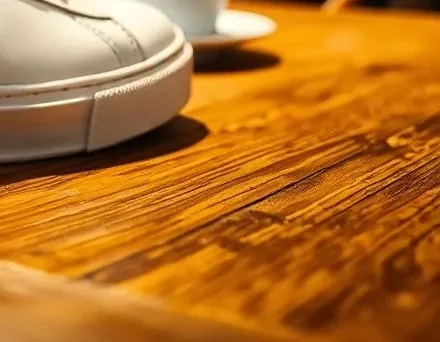 Bottom-right corner, 100%
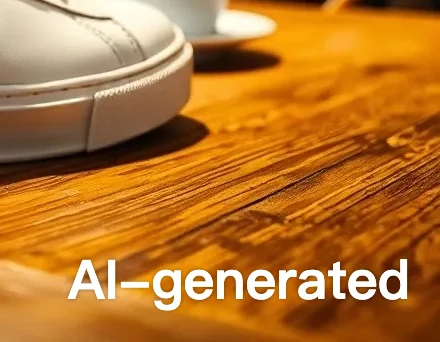 “AI-generated” at 54 px
How to use it
Open your picture and the Add Watermark dialog comes preset: “AI-generated”, white, bottom right, at 6% of the shorter side, with a 3% margin. Check the preview, click OK and download. Select several pictures and the same label goes on each one, saved to one ZIP; a single picture downloads as one file in its own format. Unlike tools that stamp every picture in the same spot, the label stays a layer: open any one picture from the results, drag the label clear of the subject and put it back in the set. On our 1152 × 896 sample the label is set at 54 px (tested 29 Oct 2026). Rules on labelling AI-generated images differ from place to place and platform to platform; this page adds the visible label only.
- Click Choose an image and select one picture or several. The first one opens with the Add Watermark dialog, preset to “AI-generated” in the bottom right at 6% size.
- Check the preview. Click another of the nine position squares if the corner covers something, or edit the words, keeping “AI”.
- Click OK. The card shows each result; click Download ZIP. To move the label on one picture, click its thumbnail, drag the label with the Move Tool (V), then click Put back in the batch.
| Item | Details |
|---|---|
| Opens | JPG, PNG, WebP, HEIC and other images; one or many |
| Preset | “AI-generated”, white, bottom right, 6% of the shorter side, margin 3%; all editable |
| Saves | JPG, PNG and WebP keep their format; the rest as PNG; one picture as one file, a set as one ZIP |
| Where | In your browser; the pictures are not uploaded |
This page adds a visible label only: it writes no metadata label and no Content Credentials, and EXIF data is not kept. White text can be hard to see on a white background; pick a dark color in the dialog. The label is in the system font; for an icon, pick Image / Logo in the dialog and load a PNG. Whether a label meets a platform's or a regulator's rule is for them to say. This page doesn't remove AI labels. China's labelling rules (Article 10) forbid deleting or altering them, and other platforms' terms usually do too.
- How do I add an "AI-generated" label to a picture for free?
- Choose the picture here: the Add Watermark dialog opens with “AI-generated” already set in the bottom-right corner. Click OK and download. It is free and the picture stays in your browser.
- How big should the label be?
- Requirements differ by place and platform. The preset is 6% of the shorter side and you can make it larger; check the rule that applies to you.
- Does this make my image compliant?
- Not on its own. A visible label is one part; some rules also ask the makers of generators for machine-readable marking, and this page writes no metadata.
- Can I remove an AI label?
- No. This page only adds labels. China's labelling rules (Article 10) forbid deleting or altering them, and other platforms' terms usually do too.
Updated 2026-10-29
Add an AI-generated label to an image
Free, nothing uploaded: stamp “AI-generated” on one picture or a whole set, then move the label on any single picture without redoing the rest.
Bottom-right corner, 100%“AI-generated” at 54 pxHow to use it
Open your picture and the Add Watermark dialog comes preset: “AI-generated”, white, bottom right, at 6% of the shorter side, with a 3% margin. Check the preview, click OK and download. Select several pictures and the same label goes on each one, saved to one ZIP; a single picture downloads as one file in its own format. Unlike tools that stamp every picture in the same spot, the label stays a layer: open any one picture from the results, drag the label clear of the subject and put it back in the set. On our 1152 × 896 sample the label is set at 54 px (tested 29 Oct 2026). Rules on labelling AI-generated images differ from place to place and platform to platform; this page adds the visible label only.
- Click Choose an image and select one picture or several. The first one opens with the Add Watermark dialog, preset to “AI-generated” in the bottom right at 6% size.
- Check the preview. Click another of the nine position squares if the corner covers something, or edit the words, keeping “AI”.
- Click OK. The card shows each result; click Download ZIP. To move the label on one picture, click its thumbnail, drag the label with the Move Tool (V), then click Put back in the batch.
| Item | Details |
|---|---|
| Opens | JPG, PNG, WebP, HEIC and other images; one or many |
| Preset | “AI-generated”, white, bottom right, 6% of the shorter side, margin 3%; all editable |
| Saves | JPG, PNG and WebP keep their format; the rest as PNG; one picture as one file, a set as one ZIP |
| Where | In your browser; the pictures are not uploaded |
This page adds a visible label only: it writes no metadata label and no Content Credentials, and EXIF data is not kept. White text can be hard to see on a white background; pick a dark color in the dialog. The label is in the system font; for an icon, pick Image / Logo in the dialog and load a PNG. Whether a label meets a platform's or a regulator's rule is for them to say. This page doesn't remove AI labels. China's labelling rules (Article 10) forbid deleting or altering them, and other platforms' terms usually do too.
- How do I add an "AI-generated" label to a picture for free?
- Choose the picture here: the Add Watermark dialog opens with “AI-generated” already set in the bottom-right corner. Click OK and download. It is free and the picture stays in your browser.
- How big should the label be?
- Requirements differ by place and platform. The preset is 6% of the shorter side and you can make it larger; check the rule that applies to you.
- Does this make my image compliant?
- Not on its own. A visible label is one part; some rules also ask the makers of generators for machine-readable marking, and this page writes no metadata.
- Can I remove an AI label?
- No. This page only adds labels. China's labelling rules (Article 10) forbid deleting or altering them, and other platforms' terms usually do too.
Updated 2026-10-29