Layers
History
Layers
History
Remove text from a screenshot
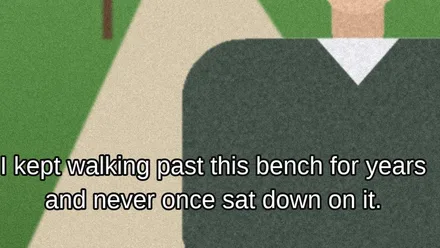
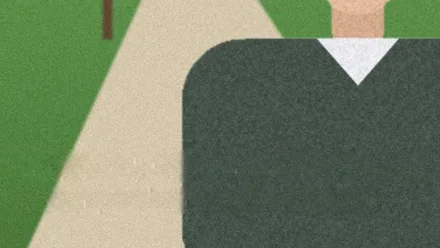
Erase the subtitles or captions on a screenshot and download a clean copy in seconds.
How to use it
Choose a screenshot and Photopip finds the lines of text on your device, then fills them from the picture around them. On a paused video frame that means the subtitles or captions. Over a flat color the gap is filled from its edges; over people, scenery or video noise, which is what most paused frames have, an inpainting model fills it. The fill goes straight into the picture, so you can touch it up with the Remove tool or undo it. This page handles still screenshots, not video files.
- Click Choose a screenshot, or drop one on the page. On a phone, pause the video, take a screenshot, then pick it from your photos.
- Wait while the lines are found and filled. The first run downloads about 33 MB of models (text detection about 5 MB, inpainting 28 MB); after that a 1920 × 1080 frame takes a few seconds.
- Click Download JPG (or PNG, matching the screenshot). "-no-text" is added to the file name.
- To remove the subtitles but keep other text, such as a sign in the shot: close the card with ✕ at its top right, drag the Rectangular Marquee Tool (M) around the subtitle lines and click Remove Text in the Properties panel. Only the selection is filled.
| Details | |
|---|---|
| Opens | PNG, JPG and WEBP screenshots: phone, desktop or a frame grabbed from a player |
| Fills | Over flat color or a gradient, from the edges of the gap; over people, scenery or video noise, with the inpainting model (512 px crops) |
| Limit & where | One screenshot at a time; text detection runs at 1280 px on the long side; in your browser, nothing uploaded |
One screenshot at a time; video files are not processed. The inpainting model works on a crop scaled to 512 px, so a long subtitle over a face or fine texture can come back a little soft: paint over it with the Remove tool (J). A subtitle on a semi-transparent dark band loses its words but keeps the band. Tiny interface text in a 4K screenshot can be skipped, because detection runs at 1280 px on the long side. Every line of text the detector finds is removed, lettering in a logo or watermark included; to keep something, select only the subtitles first (step 4).
- Can it remove subtitles from a video?
- No. This page handles one screenshot; removing subtitles from a whole video means doing every frame, which is a different kind of tool. To keep one moment, pause, take a screenshot and remove the subtitles here.
- Why does the fill look soft in some places?
- A paused frame usually has a face, a street or video grain under the subtitles, so the inpainting model fills it, working on a crop scaled to 512 pixels. A long line over fine detail comes back a little soft; paint over it with the Remove tool (J).
- The words are gone but the dark band behind them is still there. Why?
- The detector finds the letters, not the band, so only the letters are filled. To remove the band too, close the card (✕), drag the Rectangular Marquee Tool (M) over the whole band and click Remove Text in the Properties panel.
- Can I clean frames from someone else's video?
- Use your own footage or material you have permission to edit.
Updated 2026-10-24
More toolsRemove textRemove objectsImage to text
Remove text from a screenshot
Erase the subtitles or captions on a screenshot and download a clean copy in seconds.
How to use it
Choose a screenshot and Photopip finds the lines of text on your device, then fills them from the picture around them. On a paused video frame that means the subtitles or captions. Over a flat color the gap is filled from its edges; over people, scenery or video noise, which is what most paused frames have, an inpainting model fills it. The fill goes straight into the picture, so you can touch it up with the Remove tool or undo it. This page handles still screenshots, not video files.
- Click Choose a screenshot, or drop one on the page. On a phone, pause the video, take a screenshot, then pick it from your photos.
- Wait while the lines are found and filled. The first run downloads about 33 MB of models (text detection about 5 MB, inpainting 28 MB); after that a 1920 × 1080 frame takes a few seconds.
- Click Download JPG (or PNG, matching the screenshot). "-no-text" is added to the file name.
- To remove the subtitles but keep other text, such as a sign in the shot: close the card with ✕ at its top right, drag the Rectangular Marquee Tool (M) around the subtitle lines and click Remove Text in the Properties panel. Only the selection is filled.
| Details | |
|---|---|
| Opens | PNG, JPG and WEBP screenshots: phone, desktop or a frame grabbed from a player |
| Fills | Over flat color or a gradient, from the edges of the gap; over people, scenery or video noise, with the inpainting model (512 px crops) |
| Limit & where | One screenshot at a time; text detection runs at 1280 px on the long side; in your browser, nothing uploaded |
One screenshot at a time; video files are not processed. The inpainting model works on a crop scaled to 512 px, so a long subtitle over a face or fine texture can come back a little soft: paint over it with the Remove tool (J). A subtitle on a semi-transparent dark band loses its words but keeps the band. Tiny interface text in a 4K screenshot can be skipped, because detection runs at 1280 px on the long side. Every line of text the detector finds is removed, lettering in a logo or watermark included; to keep something, select only the subtitles first (step 4).
- Can it remove subtitles from a video?
- No. This page handles one screenshot; removing subtitles from a whole video means doing every frame, which is a different kind of tool. To keep one moment, pause, take a screenshot and remove the subtitles here.
- Why does the fill look soft in some places?
- A paused frame usually has a face, a street or video grain under the subtitles, so the inpainting model fills it, working on a crop scaled to 512 pixels. A long line over fine detail comes back a little soft; paint over it with the Remove tool (J).
- The words are gone but the dark band behind them is still there. Why?
- The detector finds the letters, not the band, so only the letters are filled. To remove the band too, close the card (✕), drag the Rectangular Marquee Tool (M) over the whole band and click Remove Text in the Properties panel.
- Can I clean frames from someone else's video?
- Use your own footage or material you have permission to edit.
Updated 2026-10-24
More toolsRemove textRemove objectsImage to text